Structured Decision-Making with Key Design Decisions
Author(s): Devon Sparks
“You have a meeting to make a decision, not to decide on the question.” — Bill Gates
Developing standards of any kind is hard work. Early work on Trimble-wide standards, starting with the Trimble API Standard, quickly revealed that “get in a room and talk about things” wasn’t going to work. To progress efficiently, we needed more structure. We needed a decision-making framework.
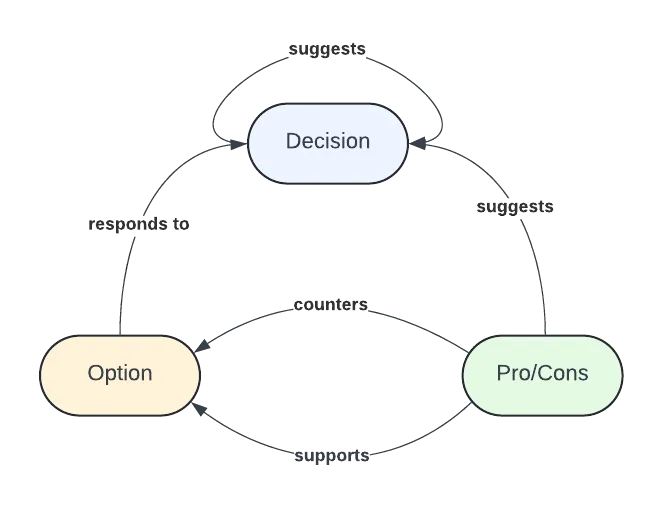
The Structure of Key Design Decisions
Key Design Decisions (KDDs) are a variant of Issue-Based Decision Making, a framework in use since at least the 1960s. KDDs are built around four key elements:
-
Decisions, framing what decision the KDD is attempting to answer.
- Example: “How should Trimble HTTP APIs report a error messages to clients?”
-
Options, outlining a proposed answer to the Decision prompt. There can be any number of Options.
- Example:“All HTTP APIs MUST report error messages according to RFC 7807”
-
Pros, tied to a particular Option, describing an objective positive quality of the Option.
- Example: “Increases standardization by reusing an existing RFC spec.”
- Non-Example: “I like it because I don’t have a better idea.”
-
Cons, tied to a particular Option, describing an objective negative quality of the Option.
- Example: “Breaking change from existing Trimble HTTP APIs that use other message formats.”
- Non-Example: “I don’t like it because I haven’t tried it.”
Decisions can prompt the creation of new Decisions. Options can prompt the creation of new Options. Pros/Cons invite others to be brought to the surface.
Taken together, a Key Design Decision framework captures a network of discovery by a stakeholder group.
The Rules of The KDD Process
KDDs are more than just a structured list of Options, Pros, and Cons. They also requires a set of rules that drive how the Options reveal the required Decision.
-
Every KDD requires a set of participants. The exact make-up of participants is domain-specific. However, experience shows it is prudent to select participants who understand the problem domain and are able to be constructive/collaborative, especially in the presence of conflicting opinions. It is loosely advised to keep the total participant count for any KDD less than 10 where feasible.
-
Every KDD requires at least one special participant, the facilitator. The faciliator SHOULD have experience in the problem domain. The facilitator’s job is to:
- Open the KDD (usually derived from another source, like an email discussion or chat) and close it when consensus is reached.
- Review Options and ask clarifying questions to ensure the intent of the Option is clear.
- Reconcile sometimes conflicting or incompatible input from stakeholders. This is the hardest part of the work and can be delegated where appropriate.
- Document the review window of the KDD (typically two (2) weeks) and call synchronous meetings as necessary.
-
Options can be raised at any time by any participant in the review window, as can new Pros and Cons.
-
If meetings are held about a KDD, ensure meeting pertains only to the KDD (all Decisions distinct from the KDD are out of scope).
KDD Implementations
As KDD is a conceptual framework, it can be implemented in any number of tools and media. As Trimblers tend to use collaboration tools like Google Suite and Github daily, we provide a standard set of implementations for each.
Google Slides Implementation
Use this implementation for use cases where:
- the decision(s) are not part of a long-lived process (it’s a “one-off” decision)
- participants are unfamiliar with other implementation methods
Avoid this implementation for use cases where:
- Many decisions will be need to be made over time with dependencies
- You’d like to keep a clean record of discussion, counterpoints, and commentary
Github Discussions Implementation
Managing KDDs in Github has the benefit that evolution of artifacts (like a documented standard) can be version controlled alongside the KDDs that triggered the versioning. Github Discussions offer built-in linking and interrogation of Discussions and repository branches, supporting forensics - even years later - for “how we got to now”.
Use this implementation for use cases where:
- decisions are part of a long-lived process (like development and evolution of a standard)
- decisions influence versioning of digital artifacts, like text files or code, also managed in Github version control.
Avoid this implementation for use cases where:
- the overhead of learning the Github workflow and tooling outweighs the effort of making the decision.
This KDD implementation follows a standard protocol:
- Every Decision is raised as a Github Discussion in the appropriate repository as its own comment. The Decision should explain necessary context and explicitly outline the question (decision) to be answered.
- Every Option should be raised as its own comment within the Decision Discussion thread. This is important because it allows:
- Anyone to add a new Option at any time.
- Comments or questions clarifying the Option can be posed below it and hidden later.
- Every Option MUST be tagged with a 👍 emoji on creation.
- Voting for a particular Option is done by clicking on the 👍 attached to the particular Option.
- When consensus has been reached (where “consensus” is specific to the problem domain and effort), the Decision Discussion is closed, and the chosen Option documented in the closing comment.
KDDs In Practice
The KDD framework presented here is currently applied in:
- The Trimble API Standard
- The Trimble Field to Cloud Standard
- Trimble Platform Architecture Discovery
Alternatives to KDDs
The basic structure of KDDs have been around for so long that many permutations of the model exists. Within the software architecture community, Architecture Decision Records represent a similar approach (though without sufficient credit to prior art). Compared to ADRs, KDDs are more structured, making them more amenable to machine processing and standardization across teams.